
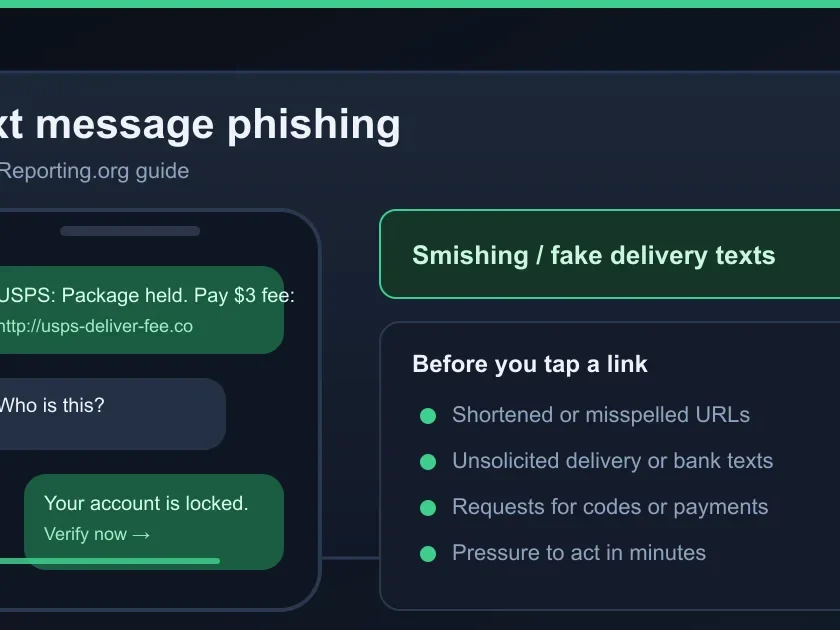
If a text message pushes you to tap a link, pay a fee, share a code, or confirm a delivery you didn’t order — pause. Smishing (SMS phishing) is now the most-reported scam category in the United States. This guide is the text-message companion to our <a href="”>Gmail phishing guide: how to spot the red flags on iPhone and Android, the seven most common patterns, and what to do if you already tapped.
Check before you act: Scamil Email Checker · Scam Checker · Scammer Lookup
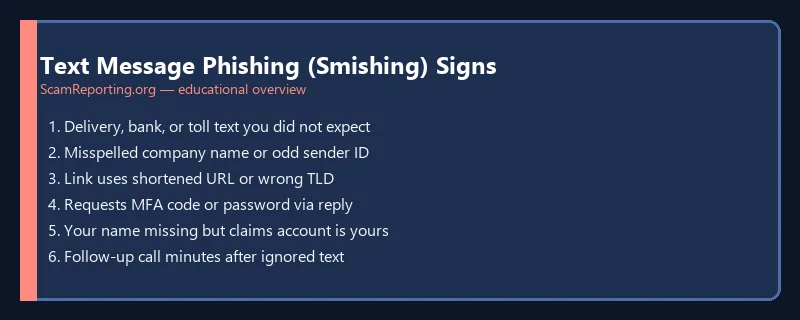
The 30-second smishing check
Before you act on any unexpected text, run this four-step check.
- Look at the sender. Real banks, USPS, the IRS, and Amazon use either a 5- or 6-digit shortcode (e.g.
454545) or a clearly branded sender ID. A regular 10-digit phone number from a state you have no connection to is a smishing tell. International numbers (anything starting with+44,+234,+63for U.S. residents) are an even stronger one. - Inspect the link without tapping. On iPhone, press-and-hold the link to preview the destination. On Android, long-press to preview. The link text might say “amazon.com” but if the preview shows
amzn-redelivery.clickor any bit.ly / TinyURL / goo.gl shortened URL, it’s smishing. - Ask yourself: did I sign up for this? Real shipping notifications only go to numbers you gave the shipper. Real bank alerts only go to numbers on file with your bank. An unexpected “Your package is delayed” from USPS when you ordered nothing is the most common smishing pattern in 2026.
- Watch for grammar and urgency. “Action required within 24 hours,” “Your acount is suspended,” “Click here imediately” — legitimate brand SMS is heavily reviewed and almost never has typos or screaming urgency.
If two or more checks fail, treat the text as smishing. Do not tap, do not reply (even “STOP” can confirm your number is live), and do not call any phone number in the text. Forward the message to 7726 (the SPAM shortcode) and then delete it.
Seven smishing patterns Americans report most
1. USPS / UPS / FedEx “delivery issue”
By far the highest-volume smishing pattern. A text claims your package has an “incomplete address” or needs a “$1.99 redelivery fee.” Real shipping carriers do not text you to collect fees. USPS in particular never sends fee-collection texts. See our <a href="”>Amazon impersonation guide for adjacent patterns.
2. “Your bank account has been locked”
A fake fraud alert pushes you to a link to “verify activity.” The link goes to a look-alike bank login page that harvests your username, password, and one-time passcode in real time. Real banks send fraud alerts asking you to call the number on your card — they never push you to a link to log in. See our <a href="”>Zelle bank impersonation guide.
3. IRS or SSA “tax / Social Security suspended”
A text claims your SSN has been “suspended,” that you owe back taxes, or that you have a refund waiting. The IRS does not initiate contact via text under any circumstance. The SSA does not text-message about suspended SSNs because SSNs are not suspended. See our <a href="”>IRS scam guide.
4. “Amazon order confirmation” you didn’t place
A text confirms a high-dollar Amazon order (“Your $899 iPhone has shipped”) to a manufactured “panic state.” You click “cancel order,” land on a look-alike Amazon login, and hand the scammer your credentials. Real Amazon never asks you to log in via a link in a text. Open the Amazon app instead.
5. Wrong number / “Hey, is this still Sarah?”
A friendly text from an unknown number that “got the wrong person” but wants to keep chatting. This is the opener for a <a href="”>pig-butchering investment scam — weeks of conversation followed by a fake crypto trading platform. Do not reply. Block.
6. “Family member in trouble” / AI voice clone follow-up
A text claims a grandchild, child, or relative is in jail or stranded and needs bail or wire money. Often paired with a follow-up call using AI voice cloning to mimic the relative. See our <a href="”>grandparent scam guide. Always verify by calling the family member directly on a known number.
7. Job offer or “task work”
An unexpected text offers part-time work doing simple tasks for $300/day. The task-work scam pays you a small amount, then asks you to “front” money for the next task — which you never get back. See our <a href="”>employment fraud guide.
iPhone-specific signals
iOS surfaces several smishing flags that are easy to miss.
- “Unknown Sender” filtering. If you have Settings → Messages → Filter Unknown Senders turned on, suspicious texts land in a separate Unknown tab. Treat any text in that tab as guilty until proven innocent.
- Disabled links from unknown senders. In iOS 18, links from numbers not in your contacts may appear as plain blue text but be tap-disabled by default. If you suddenly can tap an “unknown sender” link, you previously interacted with the sender — ask yourself why.
- Report Junk button. Below the message thread on iPhone, a “Report Junk” link appears for unknown senders. Tap it to send Apple the metadata. Apple uses these reports to improve filtering for everyone.
- Group-text scams. Smishers sometimes add you to a group text with a “celebrity” investment tipster. Tap the group name → Leave this conversation. Do not engage.
Android-specific signals
- Google Messages spam protection. When enabled (Messages → Settings → Spam protection), Google flags suspected smishing in a Spam & blocked folder. Treat anything there as confirmed scam.
- Safe Browsing link warnings. If you tap a link and Chrome shows a red “Deceptive site” warning — back out. Even if you trust the sender, the link they sent is on a known phishing list.
- RCS verification badges. Verified business senders show a blue checkmark and the brand logo in RCS-enabled chats. A bank message without a verification badge is not from the bank.
- Permission requests after tapping a link. If the page you land on asks to install an APK or grant Accessibility access, close it immediately — that’s a banking-trojan installer.
How to report smishing
Reporting smishing is the single most effective action you can take. Carriers and the FTC use your reports to refine filters and to identify campaigns.
- Forward the message to
7726(SPAM). This works on Verizon, AT&T, T-Mobile, and most U.S. carriers. The carrier asks for the originating phone number in a follow-up text — reply with it. - Report to the FTC at reportfraud.ftc.gov. Include screenshots if you lost money or shared personal data.
- For impersonation of a specific brand, forward the screenshot to that brand. Amazon:
reportphishing@amazon.com. USPS: forward tospam@uspis.govwith full headers. Banks: most have a dedicated phishing inbox listed on their security page. - On iPhone, use the in-app “Report Junk” link below the thread.
- On Android, use the three-dot menu → Block & report spam.
What to do if you tapped the link or replied
- If you entered a password or one-time code: change the password on that account immediately, sign out all other sessions, and turn on two-factor authentication. For banks, call the number on your card to flag the account — they may need to reset online banking.
- If you entered card details: call the card issuer (number on the back of the card), report fraud, and request a replacement card with new number. Most issuers will refund unauthorized charges promptly.
- If you shared your SSN: follow our <a href="”>SSN identity-theft recovery steps — credit freezes, IRS PIN, IdentityTheft.gov plan.
- If you only tapped the link but did not enter anything: close the page, clear the browser history for that site, and run a malware scan if it tried to download anything. The link itself is usually only dangerous if you submit data or install something.
- If you replied “STOP” or “NO” and then started getting more smishing: that is expected. Replying confirms your number is active. Just block the number and forward future smishes to 7726.
- If you sent money: stop here and use our <a href="”>first-24-hour recovery checklist.
Beware of “recovery” follow-ups: after a smishing attack, scammers often follow up posing as bank fraud or law enforcement offering to “recover” the money for an upfront fee. See <a href="”>recovery room scam red flags.
Make your phone harder to smish
- Turn on carrier spam protection. Verizon (Call Filter), AT&T (ActiveArmor), T-Mobile (Scam Shield) all offer free spam-call and smishing filters — most are off by default. Enable them.
- Turn on OS-level filtering. iOS: Settings → Messages → Filter Unknown Senders. Android: Messages → Settings → Spam protection.
- Use a password manager. Password managers refuse to autofill on look-alike domains, which is an early warning that catches smishing before you do.
- Never put your phone number in public profiles (social media bios, marketplace listings) when avoidable. Scrapers harvest these by the millions.
- Use two-factor authentication via an authenticator app, not SMS. SMS codes can be intercepted via SIM-swap or smishing. Authenticator apps cannot.
Frequently Asked Questions
Is replying “STOP” to a smishing text safe?
It usually does not increase the immediate risk — carriers honor STOP for legitimate marketing senders — but for scam senders it confirms the number is active and you may see more smishing. Better practice: forward to 7726 and block the number.
If I tap a smishing link but don’t enter anything, am I infected?
Usually not. Most smishing links go to credential-harvest pages; just viewing the page does nothing. The exceptions are Android sites that push APK installers and rare iOS profile installations. If you tapped a link and got prompted to install anything or grant unusual permissions, close it immediately.
How do scammers get my phone number?
Most numbers are scraped from data breaches and resold in bulk — the typical scammer buys lists of millions of numbers for under $100. Numbers also leak via public marketplace listings, social media bios, and breached loyalty programs. There is no reliable way to remove your number once leaked; the best defense is filtering, not concealment.
What does forwarding to 7726 actually do?
7726 (“SPAM” on a phone keypad) sends the message to your wireless carrier’s spam team for analysis. The carrier then asks you to reply with the original sender number, and uses both data points to block the campaign across their network. It does not report to the FTC — do that separately at reportfraud.ftc.gov.
How is smishing different from Gmail phishing?
The tactics overlap (look-alike URLs, urgency, impersonation), but smishing has a much shorter window for inspection — you see only the sender and link, with no headers or SPF/DKIM info. That makes the sender-shortcode check and the URL preview the two most important defenses. See our <a href="”>Gmail phishing guide for the email-specific signals.
Last reviewed: June 2026. Sources: FTC consumer alerts, CTIA spam-reporting documentation, Apple iOS Messages security guidance, Google Messages spam-protection documentation.
Was this guide helpful?
Your feedback helps us prioritize updates. We do not collect any personal data.
Thanks — recorded.