
An Amazon impersonation scam usually arrives as a text or email: "Your package could not be delivered," "Unauthorized order on your account," or "Confirm your payment method." These smishing messages link to fake Amazon login pages designed to steal credentials and payment data.
Daily editor note (Aug 30, 2026): We added a quick reminder based on the fraud patterns reported to us this week. See our latest alerts.
Daily editor note (Aug 20, 2026): We added a quick reminder based on the fraud patterns reported to us this week. See our latest alerts.
Daily editor note (Aug 10, 2026): We added a quick reminder based on the fraud patterns reported to us this week. See our latest alerts.
Daily editor note (Jul 31, 2026): We added a quick reminder based on the fraud patterns reported to us this week. See our latest alerts.
Daily editor note (Jul 21, 2026): We added a quick reminder based on the fraud patterns reported to us this week. See our latest alerts.
Daily editor note (Jul 11, 2026): We added a quick reminder based on the fraud patterns reported to us this week. See our latest alerts.
Related: latest scam alerts · daily watch archive · get help
July 2026 update: Prime Day and summer shipping peaks drive a fresh wave of fake delivery texts. They often mirror the same look-alike link tactics used in toll-road smishing — tiny fees, urgent deadlines, and spoofed sender names.
How Amazon Scam Texts Work
- Urgent SMS with a shortened link
- Fake login page that mirrors Amazon branding
- Credential harvest — username, password, OTP codes
- Payment theft — saved cards or new orders shipped to reshipping mules
- Follow-up calls impersonating Amazon support
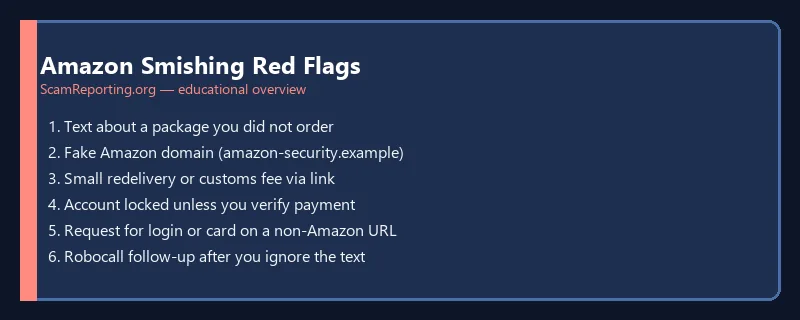
Amazon Impersonation Red Flags
- Texts from random 10-digit numbers, not Amazon’s official short codes
- Links that are not amazon.com when you long-press the URL
- Requests for gift cards to "release" a package
- Pressure to install remote support software
- Orders you never placed — especially high-value electronics
- Grammar errors or odd greetings ("Dear client")
What to Do If You Clicked a Link
- Do not enter more information — close the browser.
- Change your Amazon password from the official app or by typing amazon.com manually.
- Enable two-factor authentication on Amazon and email accounts.
- Check order history and payment methods for unauthorized purchases.
- Contact your bank if a new card was added or charged.
- Report the phishing text to Amazon and the FTC.
Broader Phishing Context
Amazon scripts are variants of smishing scams targeting USPS, FedEx, and banks. Review our phishing protection tips and stay safe hub.
Frequently Asked Questions
Does Amazon send delivery texts with links?
Amazon may send shipment updates, but always verify inside the official app. Avoid clicking links in unexpected messages.
Is a call from "Amazon fraud department" real?
Hang up and contact Amazon through the app. Scammers spoof caller ID.
Can scammers place orders on my account?
Yes, if they captured login credentials or session tokens. Check Your Orders and enable sign-in alerts.
Last reviewed: July 2026.
Was this guide helpful?
Your feedback helps us prioritize updates. We do not collect any personal data.
Thanks — recorded.