
July 2026 update: Our editors refreshed this guide based on recent FTC advisories and reader reports. See the latest alerts and weekly digest.
Daily editor note (Sep 1, 2026): We added a quick reminder based on the fraud patterns reported to us this week. See our latest alerts.
Daily editor note (Aug 12, 2026): We added a quick reminder based on the fraud patterns reported to us this week. See our latest alerts.
Daily editor note (Aug 2, 2026): We added a quick reminder based on the fraud patterns reported to us this week. See our latest alerts.
Daily editor note (Jul 23, 2026): We added a quick reminder based on the fraud patterns reported to us this week. See our latest alerts.
Daily editor note (Jul 13, 2026): We added a quick reminder based on the fraud patterns reported to us this week. See our latest alerts.
Related: latest scam alerts · daily watch archive · get help
Daily editor note (Jul 3, 2026): We added a quick reminder based on the fraud patterns reported to us this week. See our latest alerts.
Phishing & smishing protection hub: Primary guide for fraudulent texts and links. Deep dive: how phishing scams work · QR code phishing.
Smishing (SMS phishing) sends fraudulent text messages to steal credentials, install malware, or trick you into sending money. Smishing volume surged in 2026 as consumers trust texts more than email.
Common Smishing Scam Examples
1. Package delivery scams
“USPS: Your package is held — pay $1.99 re-delivery fee.” Links to a fake payment page harvesting card data.
2. Bank fraud alerts
“Chase: Did you approve a $2,400 Zelle transfer? Reply YES or call this number.” Leads to Zelle refund trick social engineering.
3. Toll road / parking fines
“Pay your outstanding toll within 24 hours to avoid penalty.” Targets drivers with urgency.
4. Job interview texts
“Your resume was selected — click to schedule interview.” Collects personal data or installs spyware.
5. Two-factor code phishing
“Your verification code is 847291 — reply to confirm account.” Scammer is logging into your account and needs your OTP.
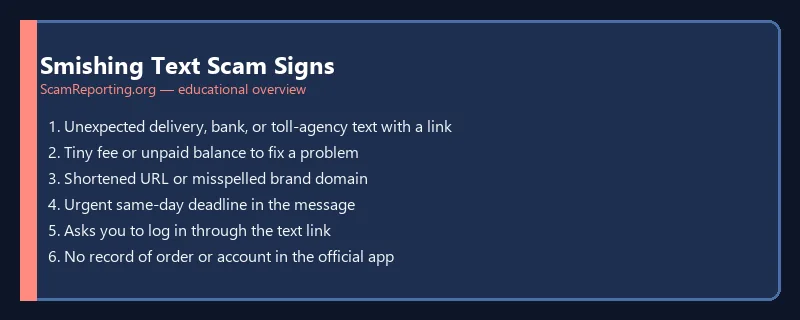
Smishing Red Flags
- Unexpected texts from unknown short codes or numbers
- Links using URL shorteners (bit.ly, tinyurl)
- Urgent deadlines (“24 hours,” “account suspended”)
- Requests to reply with personal info or verification codes
- Poor grammar or mismatched sender name vs. link domain
What to Do If You Receive a Smishing Text
- Do not click links or call numbers in the message
- Delete the text and block the sender
- Verify independently via the official app or website typed manually
- Never share OTP codes — your bank will never text asking for them
- Report by forwarding to 7726 (SPAM) in the US
If You Clicked a Smishing Link
- Disconnect from WiFi if you entered credentials
- Change passwords from a clean device
- Enable 2FA on affected accounts
- Monitor bank and credit card statements
- Report at ScamReporting.org
Related: Phishing scams guide | QR code scams | Stay safe tips
Last reviewed: July 2026.
Reported the Text? Report the Website and Sender Too
A smishing text usually points to a fraudulent site. After you delete the message, take the reporting a step further:
- How to report a scam website — flag the link so browsers warn other users.
- How to report internet fraud — report the scam to the FTC and FBI IC3.
- How to report a scammer to the FBI — if you lost money or personal data.
Frequently Asked Questions
What is smishing?
Smishing is phishing via SMS text message — fraudulent texts with malicious links or requests for personal information.
Should I reply STOP to scam texts?
Replying can confirm your number is active. Block and report instead.
How do I report scam text messages?
Forward to 7726 (SPAM) in the US, report to the FTC, and ScamReporting.org.
Related Phishing Guides
- How phishing scams work (comprehensive)
- Spear phishing protection
- DocuSign email scams
- Internet phishing scams
- AI phishing detection
- QR code phishing (quishing)
Was this guide helpful?
Your feedback helps us prioritize updates. We do not collect any personal data.
Thanks — recorded.