
Facebook & social scam hub: Primary guide for Marketplace fraud and fake seller tactics. See also holiday shopping fraud · phishing & smishing.
Facebook Marketplace makes local buying and selling simple — and scammers know it. Fraudsters use fake listings, stolen photos, bogus payment screenshots, and off-platform pressure to steal money or goods. Knowing the red flags before you meet or pay is the best protection.
How Facebook Marketplace Scams Work
Criminals exploit trust in familiar Facebook profiles and the urgency of good deals. Many scams follow the same playbook whether you are buying or selling.
- Fake or bait-and-switch listings: Sellers advertise high-demand items at unusually low prices, then deliver something different or nothing at all.
- Non-delivery scams: Buyers pay deposits or shipping fees for items that never arrive.
- Overpayment / refund scams: A “buyer” sends a fake payment screenshot and asks you to refund the difference via Zelle, Venmo, or Cash App.
- Off-platform payment push: Sellers insist on wire transfers, gift cards, or crypto instead of cash at pickup.
- Fake verification phishing: Messages claim Facebook requires identity verification via a malicious link.
- Rental and vehicle fraud: Scammers reuse photos of real properties or cars to collect deposits from multiple victims.
- Shipping label scams: Sellers trick buyers into paying for “shipping insurance” or fake courier fees.
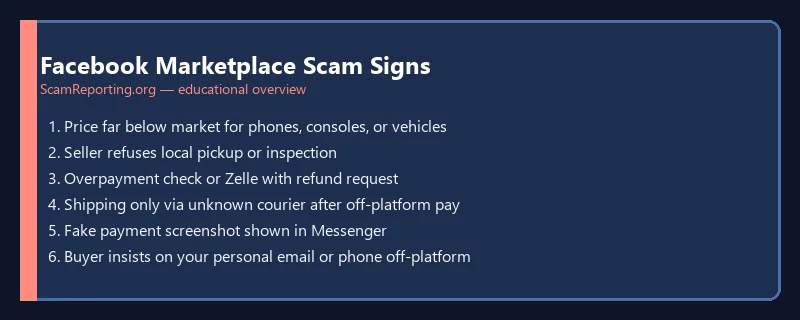
Facebook Marketplace Red Flags
- Prices far below comparable listings in your area
- Seller refuses in-person inspection or insists on shipping for local items
- New profile with few friends, no history, or recently created account
- Pressure to decide immediately — “three other buyers are interested”
- Requests to communicate only via text or WhatsApp, not Messenger
- Payment proof that is a screenshot instead of a verified in-app transaction
- Requests for gift cards, wire transfers, or crypto
- Listings copied from other sites with identical photos
How to Buy and Sell Safely
- Meet in public — police station parking lots, busy retail areas, or Marketplace safe-exchange zones.
- Inspect before paying — test electronics, verify serial numbers, and match items to photos.
- Use cash for local sales — avoid Venmo, Zelle, or wire until you physically have the item.
- Verify payments in-app — never trust edited screenshots; confirm funds cleared in your account.
- Keep communication on Messenger — creates a record if you need to report fraud.
- Research the listing — reverse-image search photos to catch stolen listings.
- Trust your instincts — if a deal feels too good, walk away.
What to Do If You Were Scammed
- Stop sending money — scammers often ask for a second “fee.”
- Report on Facebook — use the listing’s Report button and document the seller profile.
- Contact your bank or payment app if you paid by card or P2P — see our Venmo & Cash App guide and Zelle scam guide.
- File with the FTC at ReportFraud.ftc.gov and use our report form.
- Read recovery guidance — realistic options after a scam and how to avoid recovery-room fraud.
Related Guides
Marketplace fraud often overlaps with other schemes: P2P payment scams, gift card payment fraud, smishing texts, and general stay-safe practices.
FAQ
Is Facebook Marketplace safe?
Many legitimate transactions happen daily, but you must verify sellers, meet in person, and avoid off-platform payments. Treat unknown sellers like strangers — cautious verification is essential.
Can I get my money back from a Marketplace scam?
Refunds depend on how you paid. Credit cards offer stronger dispute rights than Venmo, Zelle, or gift cards. File reports quickly with Facebook, your bank, and the FTC.
Should I accept a cashier’s check on Marketplace?
Be extremely careful. Fake cashier’s checks are common — funds may appear temporarily then bounce. Cash or verified in-app payment at pickup is safer for local sales.
How do I report a scammer on Facebook Marketplace?
Open the listing or profile, tap the menu, and select Report. Include screenshots, payment records, and Messenger history if Facebook reviews the case.
Related Facebook & Social Scam Guides
- Holiday shopping & online fraud safety
- Amazon impersonation scam texts
- Phishing & smishing scam examples
Was this guide helpful?
Your feedback helps us prioritize updates. We do not collect any personal data.
Thanks — recorded.